Assign Target Text


|
Assign Target Text |
|
|
The association of a target text with a particular answer is accomplished one answer at a time. The process is straightforward and quite simple, albeit a bit tedious. But there is not another way except 'by hand' for you to teach Pathagoras what text should be associated with a particular answer. Here are the steps:
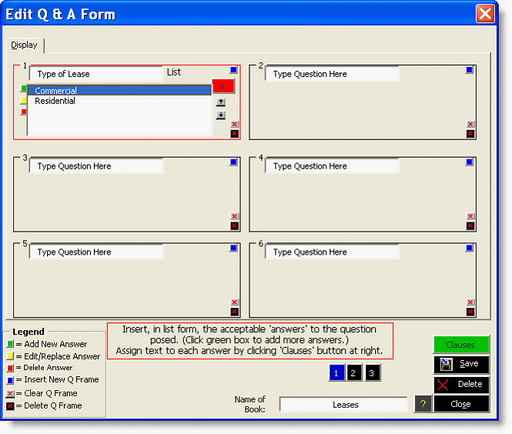
Figure 6. Ready to Assign Clauses to accompany Answers. Click an Answer. A new button appear to the right of the answer indicating how many clauses have been assigned to the answer, and a <Clauses> button appears at the top of the button stack.
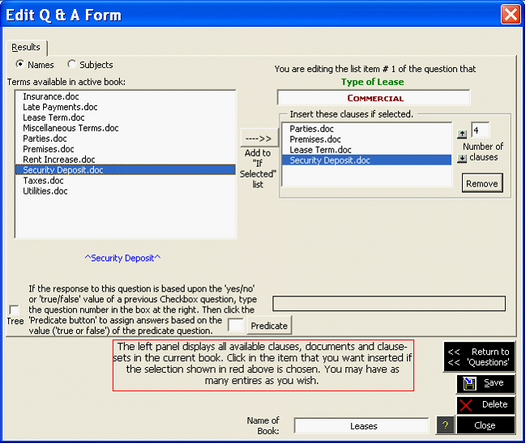
Figure 7. The clause 'assignments' screen. The available clauses are in the panel at the left. The target clauses (those that will actually be assembled if this answer is chosen) will appear at the right. Note the Question is presented (in green) at the top of the screen and the selected ‘Answer’ is shown (in red) just above the target list.
4. Once you have selected the target clause(s) for this answer, click <Return to Questions>. 5. Repeat for all answers.
|
 Press <Save> button frequently to preserve your work.
 You can test your work at anytime. Indeed, it is advisable to test frequently. That way you can have feedback and reassurance as to what you are accomplishing. To test, simply save and close your work and, using normal document assembly steps, assemble a document using the book for which you have created the Interview. (Pathagoras automatically detects the presence of the Interview and by passes the Clause Selection Screen.)