Activating the Editor


|
Activating the Editor |
|
|
(1) Display the Document Assembly Settings screen. (Display the Document Assembly (Libraries & Books) screen. Check the <Settings> box just beneath the Next button and then click <Next>.
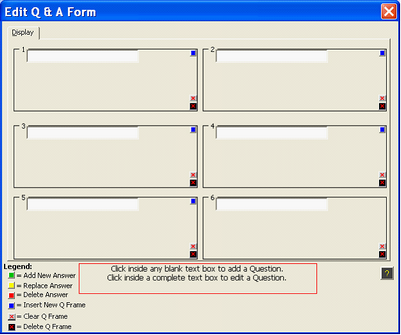
(2) Select a book for which you want to create the interview. Click the <Q & A> button which will appears at the bottom of the book listings (adjacent to the <Clear> and <Switch> buttons). A screen that looks like this will next appear:
Figure 1. A blank worksheet form.
The above is the worksheet by which the Pathagoras Interview screen will be created. Note that it is divided into six frames. Each frame with hold one of up to 18 questions (6 questions per page) that may be posed to the end-user. (Please note -- the above is just the worksheet. It is not what the end-user will see. To see an end-user’s screen, check out 'What the User Sees' pages.) |