|
|


 |
 |
 |
 |
||||||||

|
Pathagoras
Tip of the Week
Instant Database Masks
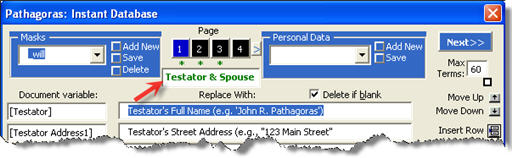
Page Titles: You can add page titles to each screen of an Instant Database Mask. Do so by inserting a meaningful title (e.g., "Client Data", "Product Descriptions", "Court Information", etc.) in the box at the top of each Instant Database Screen. As discussed elsewhere (see Mask entry at left), an Instant Database Mask is in the nature of a client or customer data intake sheet. While its primary use is to replace variables within a document with the designated 'replacement text' values on the IDB screen, it can be (and typically is) used to save that data for reuse. (That is the 'Database' part of "Instant Database.") To the extent that you are using masks as your client intake vehicle, consider rearranging the entries (using the up and down arrows at the right of the screen) into their most logical 'intake sheet' order, and add titles to the resulting individual IDB pages. The title will assist the data input person in understanding the nature of the information that is being requested by the variable.
|
||||||||||